Why AI-Generated Characters Look Different in Every Scene (And How to Actually Fix It)
AI-generated characters drift from scene to scene by default. Here's the exact mechanism reference, context engine, and review that keep them consistent.
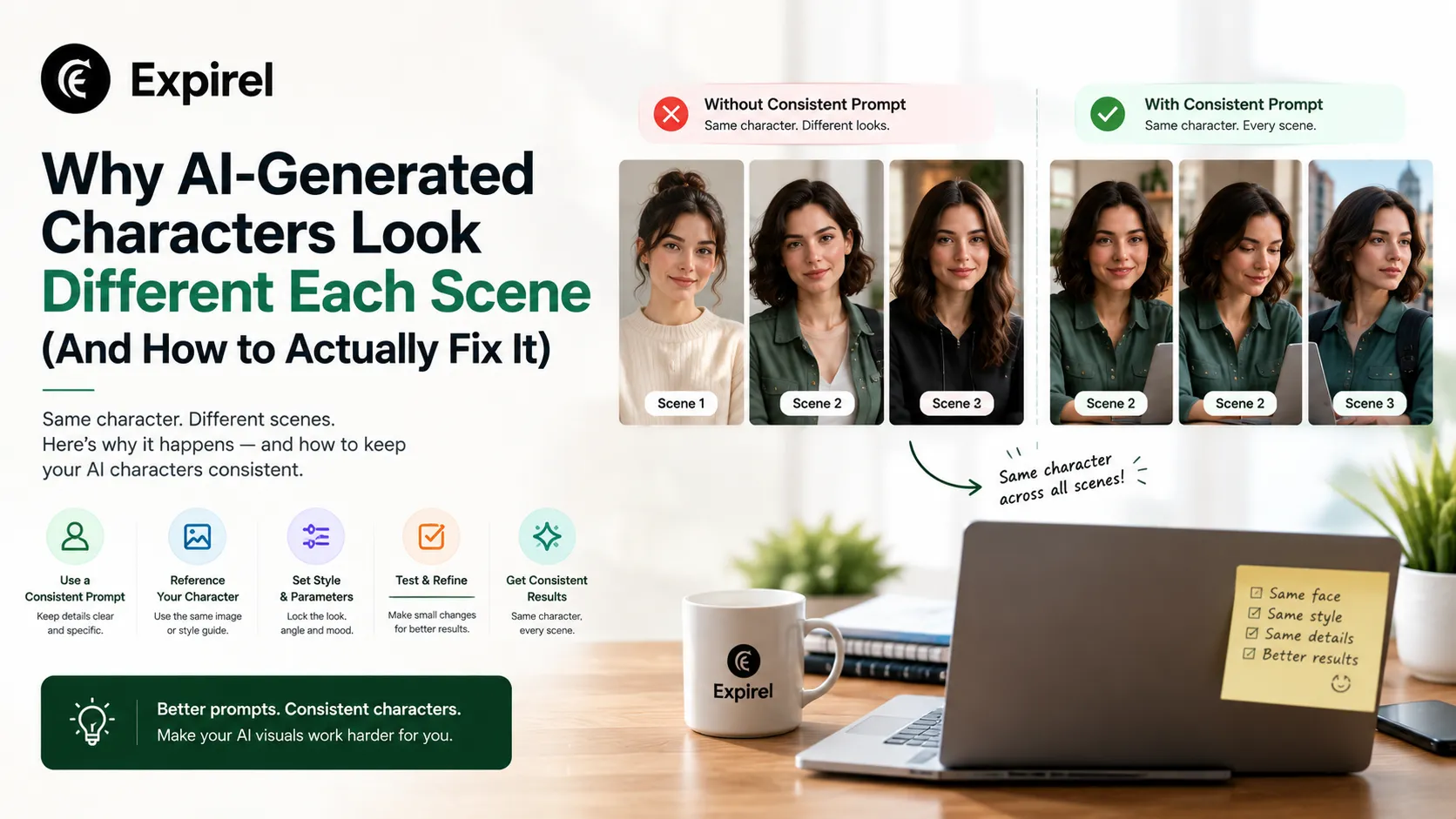
If you've generated more than a handful of shots with an AI video tool, you've probably seen it: the same character, described the same way, coming out looking like a slightly different person from one scene to the next. A different jawline here, a costume detail that's subtly off there, eyes that were brown in shot four and hazel in shot twelve.
This isn't a bug you can prompt your way around, and it isn't a sign you picked the wrong AI model. It's the default outcome of how generative models actually work, and understanding why is the first step to fixing it.
Why Character Drift Is the Default, Not the Exception
A generative model has no memory between prompts. Ask it to generate the same character twice, working only from a text description, and it produces its best independent guess each time. Those two guesses don't automatically agree on facial proportions, exact costume details, or the small features that make a character recognizable.
Across two or three shots, this drift is often invisible close enough that nobody notices. Across dozens of shots in a full project, it accumulates. By the midpoint of a longer piece, the character can look noticeably different from where they started, without any single generation being the obvious point of failure. That's what makes this hard to catch in the moment and easy to catch only once the whole sequence is cut together.
Fix #1: What Goes Into the Reference Actually Matters
Solving drift starts before a single frame gets generated with what you feed the system as the character's reference.
A single photo tells a model what a character looks like from one angle, in one lighting condition, with one expression. That's not enough information for the model to reconstruct the character correctly the moment a scene calls for a three-quarter turn, a different emotional beat, or a change in lighting. A reference built actually to hold up needs:
A front-facing view
A three-quarter angle
A profile view
A back view, if the project will ever show it
A dedicated close-up on the face
Each angle gives the underlying model a different piece of the character's actual three-dimensional structure to work from. Skipping this step and generating from a single photo is the single most common reason a character drifts early in a project; the model was never given enough information to keep the character steady in the first place.
Fix #2: A Persistent Context Engine, Not a Manual Reapply
Once a real reference exists, it needs to be held as the standing reference for every future shot in the project not something a creator has to manually reattach to every new prompt.
This is where Invideo Agent’s persistent context engine becomes useful. Once a director has established a character and the visual rules for a project, those references can be carried into the next shot instead of rebuilding everything from scratch. The agent can then choose from its 200+ integrated models, including Veo 3.1, Sora 2, Kling AI, Seedance 2.5, Runway, PixVerse, Hailuo, WAN, Recraft, GPT Image 2.0, and Nano Banana 2, while generating new shots against the established reference.
But the reference itself isn't the whole solution. What matters just as much is what happens after each generation. If the face changes, proportions shift, or a costume detail starts drifting, the result needs to be checked and corrected before it becomes part of the final sequence. That check-and-regenerate loop is what helps maintain consistency across dozens of shots. Without it, even a strong reference can gradually lose accuracy as a project gets longer.
Fix #3: The Same Standard Has to Apply Across Every Model, Not Just One
A real project rarely stays with one generative model for its entire runtime; different shots suit different models' specific strengths. An action-heavy sequence and a quiet dialogue scene often call for entirely different tools. That's why the difference between shot-level and project-level video generation matters when deciding how different AI video tools should fit into the same workflow.
This is where the difference between AI-assisted and agentic video editing becomes important: a single-model tool runs into a hard limit that a context-engine approach doesn't: the locked reference has to apply consistently regardless of which model actually renders a given shot. The context engine sits above the model-routing layer, applying the same consistency standard regardless of which of the 200+ integrated models is rendering underneath it. Switching models between scenes shouldn't mean the character's consistency resets to zero.
Where This Still Breaks: Two Characters in Close Contact
Multi-character interaction is the hardest case for any consistency mechanism. Two characters that are each individually well-locked can still blur together the moment they're generated interacting in close physical contact a handshake, an embrace, a fight scene. Each character's reference was built and checked in isolation from the other, so the model has no established rule for how they should look combined.
The practical fix: treat that specific interaction as its own reference case. Sketch the physical arrangement and generate a dedicated, fused reference for that exact configuration, rather than assuming two independently verified characters will automatically combine correctly. This is a real limitation worth planning for, not something to discover mid-project when a key scene comes out wrong.
Fix #4: A Human Review Pass on a Real Timeline
The context engine's check happens at generation time, shot by shot. A full project still benefits from a second, human-driven review once shots exist together in sequence, catching subtle drift the automatic check didn't flag, or verifying consistency across a mix of generated and real footage. That same sequence-level review becomes even more important when a finished campaign has to be adapted for different markets, where video localization across languages can introduce changes to voice identity, performance, and lip sync that aren't obvious when reviewing each version in isolation.
This is what Invideo Editor is built for: a professional timeline editor that does what tools like DaVinci and Premiere do drag, trim, cut, layer while also taking agent instructions on the same timeline. A consistency issue spotted during review a shot that reads slightly off once seen next to its neighbors gets corrected precisely because the timeline treats shots, scenes, characters, and audio as separate, editable objects. It's free to use, and because editors, collaborators, and AI agents all work inside the same shared project, that final check happens with the whole team present rather than as a siloed, after-the-fact pass.
A Practical Checklist for Your Own AI Video Project
Run through this before you generate a single shot:
1. Build a real multi-angle reference. Front, three-quarter, profile, back if needed, plus a close-up on the face. Never start from a single photo.
2. Lock the reference before generating anything. Treat it as the project's source of truth, not a rough starting point you'll refine later.
3. Let every shot get checked against the reference before you accept it. Don't manually eyeball consistency shot by shot; that's exactly how drift slips through unnoticed.
4. Plan multi-character interaction scenes separately. If two locked characters need to touch, embrace, or fight, build a dedicated fused reference for that specific scene ahead of time.
5. Do a full sequence review before calling the project done. Watch shots back to back, not in isolation — drift that's invisible shot-by-shot often becomes obvious the moment two scenes sit side by side.
6. Keep switching models on the table. A consistency mechanism that only works with one model forces you to choose between the right tool for a shot and keeping your character intact. It shouldn't be a trade-off.
Mistakes Creators Actually Make With AI Character Consistency
Generating from one reference photo. The most common cause of early drift the model simply never had enough angles to work from.
Assuming a "strong enough" model won't drift on its own. Every model regenerates independently by default. Consistency is a mechanism you build in, not a property that emerges from model quality alone.
Skipping the sequence-level review. Catching drift shot by shot is unreliable. The same character sitting next to their earlier self is where problems actually surface.
Treating two-character scenes like two single-character scenes. Individually correct characters can still blur together the moment they interact — this needs its own plan, not an assumption.
The Bigger Pattern: Persistent Context Is Becoming the Baseline, Not the Exception
The interesting part of this approach goes beyond AI video. More AI tools are moving toward the same basic idea: remember what has already been established, use that context when handling the next task, and check the result instead of simply starting over each time.
You can see the same principle in everyday AI-assisted workflows. For example, an expiry and habit tracking website like Expirel uses AI photo scanning to help identify product information from an image, reducing the amount of information a user has to enter manually before tracking an item. The use case is completely different from generating consistent characters, but the underlying idea is similar: useful AI should preserve relevant context and reduce repetitive work rather than making users start from scratch every time.
That's where AI becomes more practical—not simply by generating something once, but by remembering, checking, and improving what comes next.
The Bottom Line
Keeping a character consistent across a full AI-generated project comes down to three things working together: a reference built with enough angles to actually capture the character, a system that checks every new shot against that reference and regenerates until it holds, and that same check applying no matter which underlying model renders a given shot. The hardest edge case characters interacting closely with each other still need deliberate, separate handling rather than an assumption that two verified references will combine correctly on their own. Get the reference right, keep the check running on every shot, and review the full sequence before calling it done; that's what actually gets a character from a locked reference sheet to a consistent presence across a finished film.
Frequently Asked Questions
Q: Why does my AI-generated character look different in every scene?
Because generative models have no memory between prompts. Each generation is an independent event, and without a locked reference and a system checking every new shot against it, small variations in facial proportions, costume details, and features compound as the project goes on.
Q: How many reference images does a character actually need?
At minimum: a front view, a three-quarter angle, a profile, and a close-up on the face. Add a back view if the project will ever show the character from behind. A single photo is not enough information for a model to reconstruct the character reliably from a new angle or expression.
Q: Can character consistency work across different AI models in the same project?
Yes, if the consistency mechanism sits above the model layer rather than being tied to one specific model. A persistent context engine applies the same reference check regardless of which underlying model renders a given shot, which is what allows switching models between scenes without resetting consistency.
Q: Why do two consistent characters still look wrong when they interact?
Because each character's reference was built and verified in isolation. The model has no established rule for how they should look combined until you give it one, which is why close-contact scenes need a dedicated, fused reference built specifically for that interaction.
Q: Is an automated consistency check enough, or do I still need to review manually?
Automated checks catch obvious drift at generation time, but a human review across the full sequence still matters. Subtle drift is often only visible once shots sit next to each other in order, which is why a proper editing timeline, not just the generation step, is part of a complete workflow.